JUIPAITHANE


ERMS
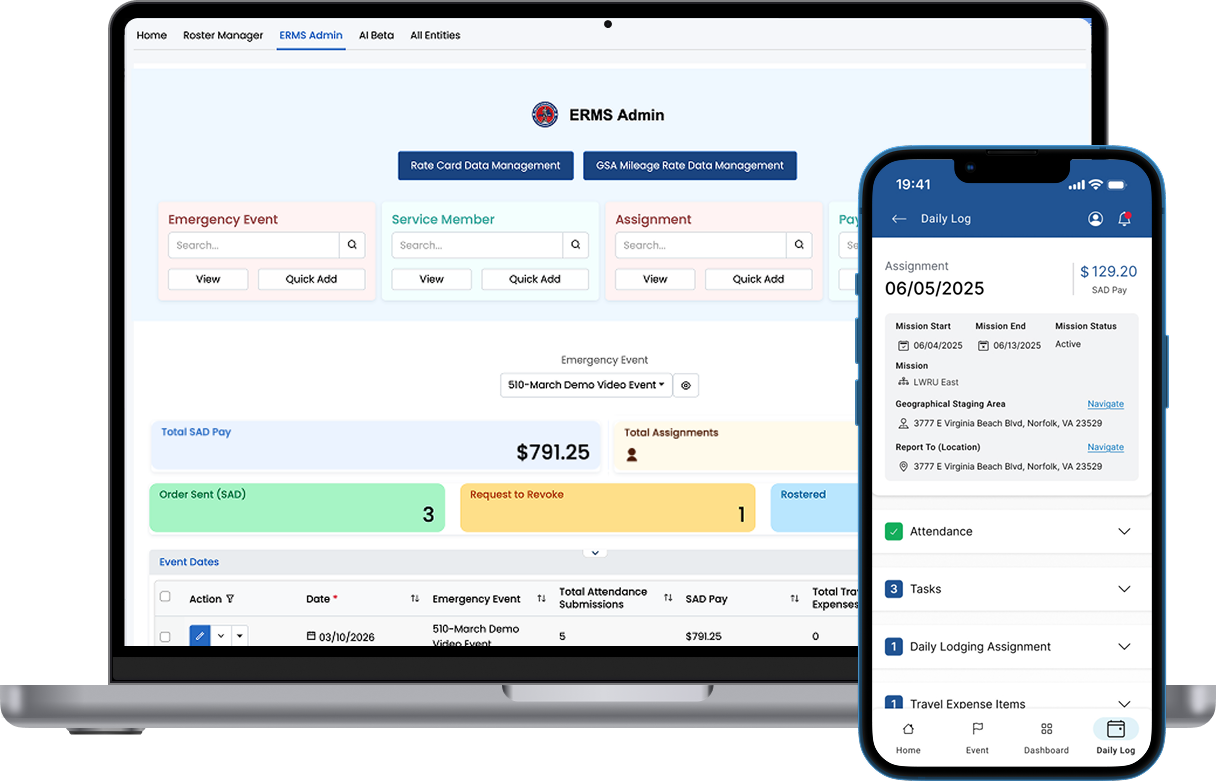
I led the planning and design for the ERMS mobile app, used by the Virginia National Guard.
Client:
VA National Guard
Role:
Lead UI/UX Designer
Industry:
Government
The Problem
Solving the administrative burden of emergency event management and audit preparedness for the Virginia National Guard
The Impact
Reduced coordination effort and streamlined "cradle-to-grave" emergency response management for state-wide emergency events

Role Snapshot
My role:
Lead UI/UX Designer
Team:
1 PM, 1 Designer, and 4 Engineers
Responsibilities:
Systems Thinking, Workflow Mapping, Accessibility Auditing, High-Fidelity UI
Emergency Response Management System
The Situation
Our client, the VA National Guard (VaNG), enlisted our services to build an Emergency Response Management System (ERMS) to help them manage all the planning and activity involved in emergency response. The ERMS web app enables the VaNG to plan their emergency events, keep track of funding for auditing, roster service members to an event, assign tasks, manage HR issues, and much more.
After using our application for a couple years now, they expressed an interest in offering the service members themselves access to the application. While this could be done through creating a new application role and refining its permissions, I suggested we create a mobile application so service members could use the app while out on the field.
The Process
Since our web app had already been live for a while, we had the crux of the mobile application ready to go. Instead of having to worry about how we would connect different entities together, we just had to focus on displaying them nicely on a mobile screen. While this could've been done in the usual manner (designing screen by screen, component by component, with continuous back and forth between development and design teams), I took this opportunity to pitch a new idea to our team: A Figma plugin that connects your application's backend directly to your Figma designs. FigBind, the plugin we developed, took us a few months to fine tune, with the help of this ERMS mobile app as our test case, and in the end we were able to create a seamless connection between designs and application structure that minimized the need for tedious design time and back and forth communication. See more about FigBind here.
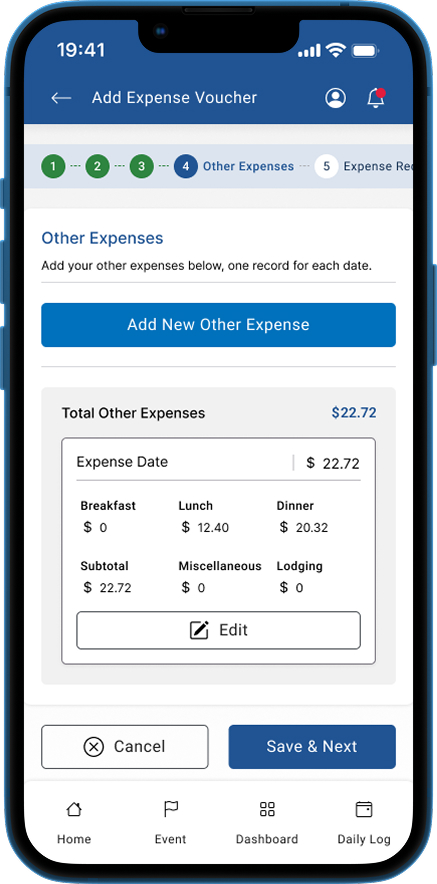
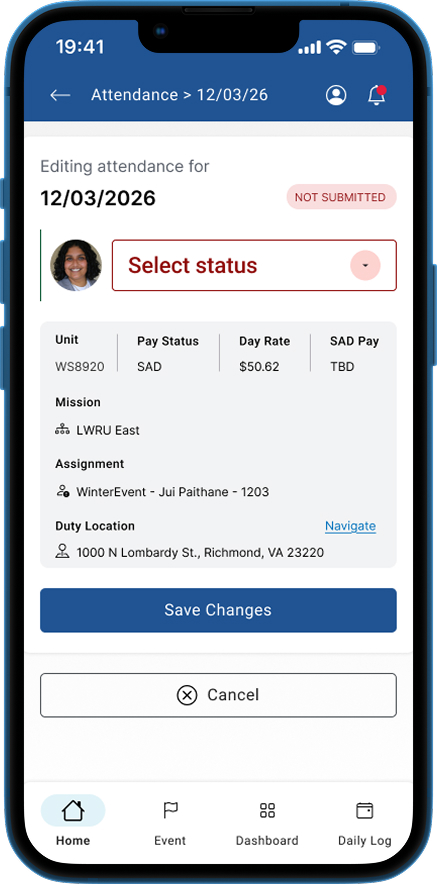
Concurrently, I dove into our target user persona for the mobile app: a service member who is out on the field, needing to complete certain daily tasks and stay up to date on assignments and logistics like meals and lodging for that day. Since this user would be busy with stressful tasks out on the field, it was important that our mobile application was as easy to use as possible. I decided to display all the high-use items right on the home page so that the service member never had to question where to go to complete a certain task. Additionally, I added limitations to each task depending on what "stage" of their day they were in. For example, the user is unable to do anything on the application until they submit their attendance for that day. Once submitted, the user is able to interact with their daily tasks and upload expense vouchers. This strategy was used throughout the app for various stage-based action items, ensuring all the proper steps were followed and easing worries during audits.
The Outcome
I directed the planning and created the designs for the ERMS mobile app, using FigBind. To ensure a seamless user experience, I adjusted the application model to allow for self-submission of various entity status updates (like attendance and task status) with a new verification status property to ensure the service members' self submitted information was accurate. Additionally, I found it prudent to include a "daily log" of all activity done by a service member on a specific day, so the user could see all their pertinent data on one screen. This required a major model update, as we needed to connect all dates used throughout the application to this new daily log entity.
On the service member home page, the user can see all their data for any date by clicking one button! Further, the home screen has quick action buttons to navigate the service member directly to that date's attendance, making their daily use of the application seamless. A top priority of our client was to track any and all expenditure connected to an event, so I designed easy to use expense voucher screens that walk the service member through adding new expenses and expense receipts.
With the aforementioned model changes, we were also able to provide the admin, who use the web app, a more powerful dashboard. I designed the dashboards for different roles to include important data for their jobs, enhanced by the daily log data metrics we were able to create with the model updates. The mobile application is currently in the process of reviewal by the highest level admin within our client's network, and we are hoping to take it live within the next few months.


JUIPAITHANE
ERMS
I led the planning and design for the ERMS mobile app, used by the Virginia National Guard.
Client:
VA National Guard
Role:
Lead UI/UX Designer
Industry:
Government
The Problem
Solving the administrative burden of emergency event management and audit preparedness for the Virginia National Guard
The Impact
Reduced coordination effort and streamlined "cradle-to-grave" emergency response management for state-wide emergency events

Role Snapshot
My role:
Lead UI/UX Designer
Team:
1 PM, 1 Designer, and 4 Engineers
Responsibilities:
Systems Thinking, Workflow Mapping, Accessibility Auditing, High-Fidelity UI
Emergency Response Management System
The Situation
Our client, the VA National Guard (VaNG), enlisted our services to build an Emergency Response Management System (ERMS) to help them manage all the planning and activity involved in emergency response. The ERMS web app enables the VaNG to plan their emergency events, keep track of funding for auditing, roster service members to an event, assign tasks, manage HR issues, and much more.
After using our application for a couple years now, they expressed an interest in offering the service members themselves access to the application. While this could be done through creating a new application role and refining its permissions, I suggested we create a mobile application so service members could use the app while out on the field.
The Process
Since our web app had already been live for a while, we had the crux of the mobile application ready to go. Instead of having to worry about how we would connect different entities together, we just had to focus on displaying them nicely on a mobile screen. While this could've been done in the usual manner (designing screen by screen, component by component, with continuous back and forth between development and design teams), I took this opportunity to pitch a new idea to our team: A Figma plugin that connects your application's backend directly to your Figma designs. FigBind, the plugin we developed, took us a few months to fine tune, with the help of this ERMS mobile app as our test case, and in the end we were able to create a seamless connection between designs and application structure that minimized the need for tedious design time and back and forth communication. See more about FigBind here.
Concurrently, I dove into our target user persona for the mobile app: a service member who is out on the field, needing to complete certain daily tasks and stay up to date on assignments and logistics like meals and lodging for that day. Since this user would be busy with stressful tasks out on the field, it was important that our mobile application was as easy to use as possible. I decided to display all the high-use items right on the home page so that the service member never had to question where to go to complete a certain task. Additionally, I added limitations to each task depending on what "stage" of their day they were in. For example, the user is unable to do anything on the application until they submit their attendance for that day. Once submitted, the user is able to interact with their daily tasks and upload expense vouchers. This strategy was used throughout the app for various stage-based action items, ensuring all the proper steps were followed and easing worries during audits.
The Outcome
I directed the planning and created the designs for the ERMS mobile app, using FigBind. To ensure a seamless user experience, I adjusted the application model to allow for self-submission of various entity status updates (like attendance and task status) with a new verification status property to ensure the service members' self submitted information was accurate. Additionally, I found it prudent to include a "daily log" of all activity done by a service member on a specific day, so the user could see all their pertinent data on one screen. This required a major model update, as we needed to connect all dates used throughout the application to this new daily log entity.
On the service member home page, the user can see all their data for any date by clicking one button! Further, the home screen has quick action buttons to navigate the service member directly to that date's attendance, making their daily use of the application seamless. A top priority of our client was to track any and all expenditure connected to an event, so I designed easy to use expense voucher screens that walk the service member through adding new expenses and expense receipts.
With the aforementioned model changes, we were also able to provide the admin, who use the web app, a more powerful dashboard. I designed the dashboards for different roles to include important data for their jobs, enhanced by the daily log data metrics we were able to create with the model updates. The mobile application is currently in the process of reviewal by the highest level admin within our client's network, and we are hoping to take it live within the next few months.

JUIPAITHANE
ERMS
I led the planning and design for the ERMS mobile app, used by the Virginia National Guard.
Client:
VA National Guard
✧
Role:
Lead UI/UX Designer
✧
Industry:
Government
The Problem
Solving the administrative burden of emergency event management and audit preparedness for the Virginia National Guard
The Impact
Reduced coordination effort and streamlined "cradle-to-grave" emergency response management for state-wide emergency events

Role Snapshot
My role:
Lead UI/UX Designer
Team:
1 PM, 1 Designer, and 4 Engineers
Responsibilities:
Systems Thinking, Workflow Mapping, Accessibility Auditing, High-Fidelity UI
Emergency Response Management System
The Situation
Our client, the VA National Guard (VaNG), enlisted our services to build an Emergency Response Management System (ERMS) to help them manage all the planning and activity involved in emergency response. The ERMS web app enables the VaNG to plan their emergency events, keep track of funding for auditing, roster service members to an event, assign tasks, manage HR issues, and much more.
After using our application for a couple years now, they expressed an interest in offering the service members themselves access to the application. While this could be done through creating a new application role and refining its permissions, I suggested we create a mobile application so service members could use the app while out on the field.
The Process
Since our web app had already been live for a while, we had the crux of the mobile application ready to go. Instead of having to worry about how we would connect different entities together, we just had to focus on displaying them nicely on a mobile screen. While this could've been done in the usual manner (designing screen by screen, component by component, with continuous back and forth between development and design teams), I took this opportunity to pitch a new idea to our team: A Figma plugin that connects your application's backend directly to your Figma designs. FigBind, the plugin we developed, took us a few months to fine tune, with the help of this ERMS mobile app as our test case, and in the end we were able to create a seamless connection between designs and application structure that minimized the need for tedious design time and back and forth communication. See more about FigBind here.
Concurrently, I dove into our target user persona for the mobile app: a service member who is out on the field, needing to complete certain daily tasks and stay up to date on assignments and logistics like meals and lodging for that day. Since this user would be busy with stressful tasks out on the field, it was important that our mobile application was as easy to use as possible. I decided to display all the high-use items right on the home page so that the service member never had to question where to go to complete a certain task. Additionally, I added limitations to each task depending on what "stage" of their day they were in. For example, the user is unable to do anything on the application until they submit their attendance for that day. Once submitted, the user is able to interact with their daily tasks and upload expense vouchers. This strategy was used throughout the app for various stage-based action items, ensuring all the proper steps were followed and easing worries during audits.
The Outcome
I directed the planning and created the designs for the ERMS mobile app, using FigBind. To ensure a seamless user experience, I adjusted the application model to allow for self-submission of various entity status updates (like attendance and task status) with a new verification status property to ensure the service members' self submitted information was accurate. Additionally, I found it prudent to include a "daily log" of all activity done by a service member on a specific day, so the user could see all their pertinent data on one screen. This required a major model update, as we needed to connect all dates used throughout the application to this new daily log entity.
On the service member home page, the user can see all their data for any date by clicking one button! Further, the home screen has quick action buttons to navigate the service member directly to that date's attendance, making their daily use of the application seamless. A top priority of our client was to track any and all expenditure connected to an event, so I designed easy to use expense voucher screens that walk the service member through adding new expenses and expense receipts.
With the aforementioned model changes, we were also able to provide the admin, who use the web app, a more powerful dashboard. I designed the dashboards for different roles to include important data for their jobs, enhanced by the daily log data metrics we were able to create with the model updates. The mobile application is currently in the process of reviewal by the highest level admin within our client's network, and we are hoping to take it live within the next few months.