JUIPAITHANE


FigBind
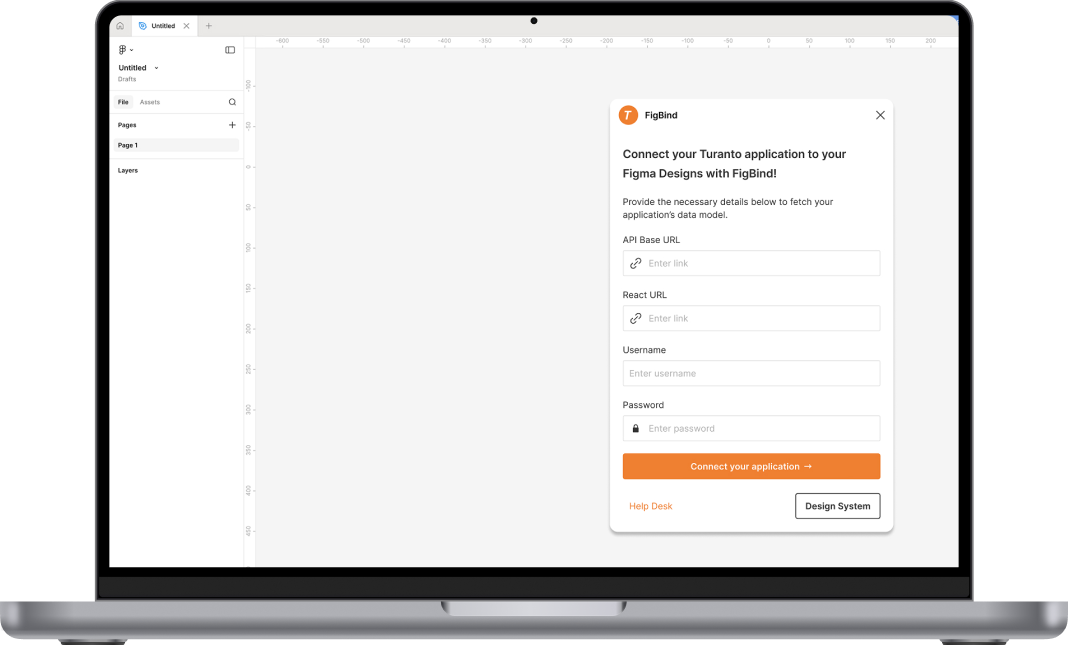
FigBind is Figma plugin that connects users' Figma designs directly to their application backend, enabling live data preview and streamlined data mapping and code generation.
Client:
eTelic Inc.
Role:
Product Designer & Manager
Industry:
Technology
The Problem
Eliminating friction in the developer handoff and reducing gaps between designs and developer output.
The Impact
Streamlined the developer handoff by syncing Figma designs with application backends and live code.

Role Snapshot
My role:
Product Designer & Manager
Team:
1 PM/Designer, 2 Developers, Stakeholder from eTelic Inc.
Responsibilities:
Systems Thinking, Workflow Mapping, High-Fidelity UI, Marketing Content Creation
A Figma Plugin Connecting Data to Design
The Situation
At etelic Inc., our mission is to make application building simple, secure, and scalable. We developed a no-code, low-code application developer, Turanto, that enables users to build large, enterprise level applications, without needing to code. We have countless templates for various industries, and a plethora of different features built into the platform. For most of our clients, the template designs for both web and mobile were more than sufficient. But this wasn't good enough for us.
A good user interface is crucial for the success of any application, but it requires constant back and forth communication between designers, developers, and stakeholders. This pipeline takes time, money, and resources -- things that are limited for us as a small business. Even with Figma's native tools and existing plug-ins, it took weeks to develop and deploy custom screens for our enterprise-level applications.
So, we got to thinking... What if designers could directly connect their Figma files to live APIs, without needing to know a single line of React code? What if we could templatize front-end development just like we did with back-end development?
The Process
I started by understanding existing industry solutions for this problem. While there are a plethora of plugins that get you 80% of the way, none of them offered full end-to-end data mapping. Since we were using our own in-house software, Turanto, as a use case, I knew we would be able to bring in much more of the application structure than other industry solutions. As a UI/UX designer, I was already familiar with the usual design process and I wanted to maintain as much of that for users using FigBind.
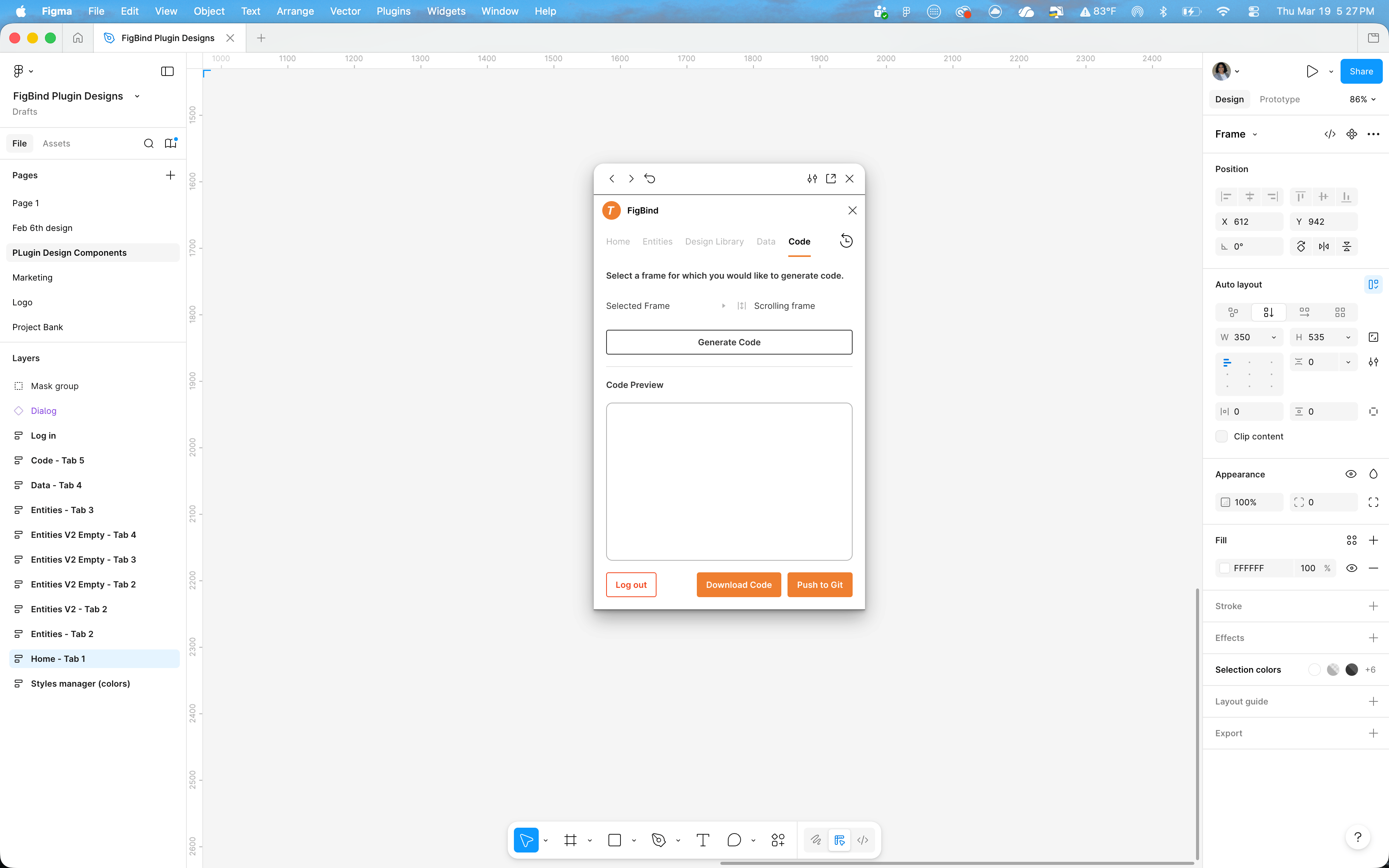
Designers are already used to inserting component instances in various places to repeat designs, so I decided the best way to import the data model would be through these components. Turanto being an entity based application meant that each entity had certain properties, all of which could be converted into text. So, I pitched the idea of a "property bank". Each entity, when imported into Figma through FigBind, would have a component set (the property bank). This component set has two variant groups: Data Type and Entity Property. Data Type enables users to select between label and value, and entity property allows users to select which specific property they would like to display. The property bank component set contains all properties for an entity, with both their label and value. To "bind" this data to a custom screen, the user simply has to insert an instance of the property bank component and select the desired variant. Additionally, the master component set can be customized as normal, so users have full control over how these properties show up throughout the app.
Turanto is build to be reproducible and scalable, meaning the components used throughout the applications are uniform and repeatable. This enabled me to create designs for each of the existing components, like cards or grids, culminating in a template that was easy to repeat and import into the application. Our development team worked on created a code generation component for FigBind, which enhanced the user experience as designers no longer had to go back and forth with developers to identify the specifics of what needs to be developed.
The Outcome
Often, designers skip the error pages (No internet, search not found, etc.), leaving developers to guess later. With FigBind, there is no guess work needed. FigBind provides your team with pre-built screens for every error page and edge case, ensuring that your end users never experience any gaps in their user journey.
In the traditional workflow, development can only begin AFTER designs are completed. The consequtive process creates time sinks, forcing one team to stop working so that the other team can begin. Further, a common pain point in this process is the Linear Waterfall Bottleneck. If a developer finds a technical limitation in Week 3, the designer has to go back to Phase 1, delaying the entire launch.
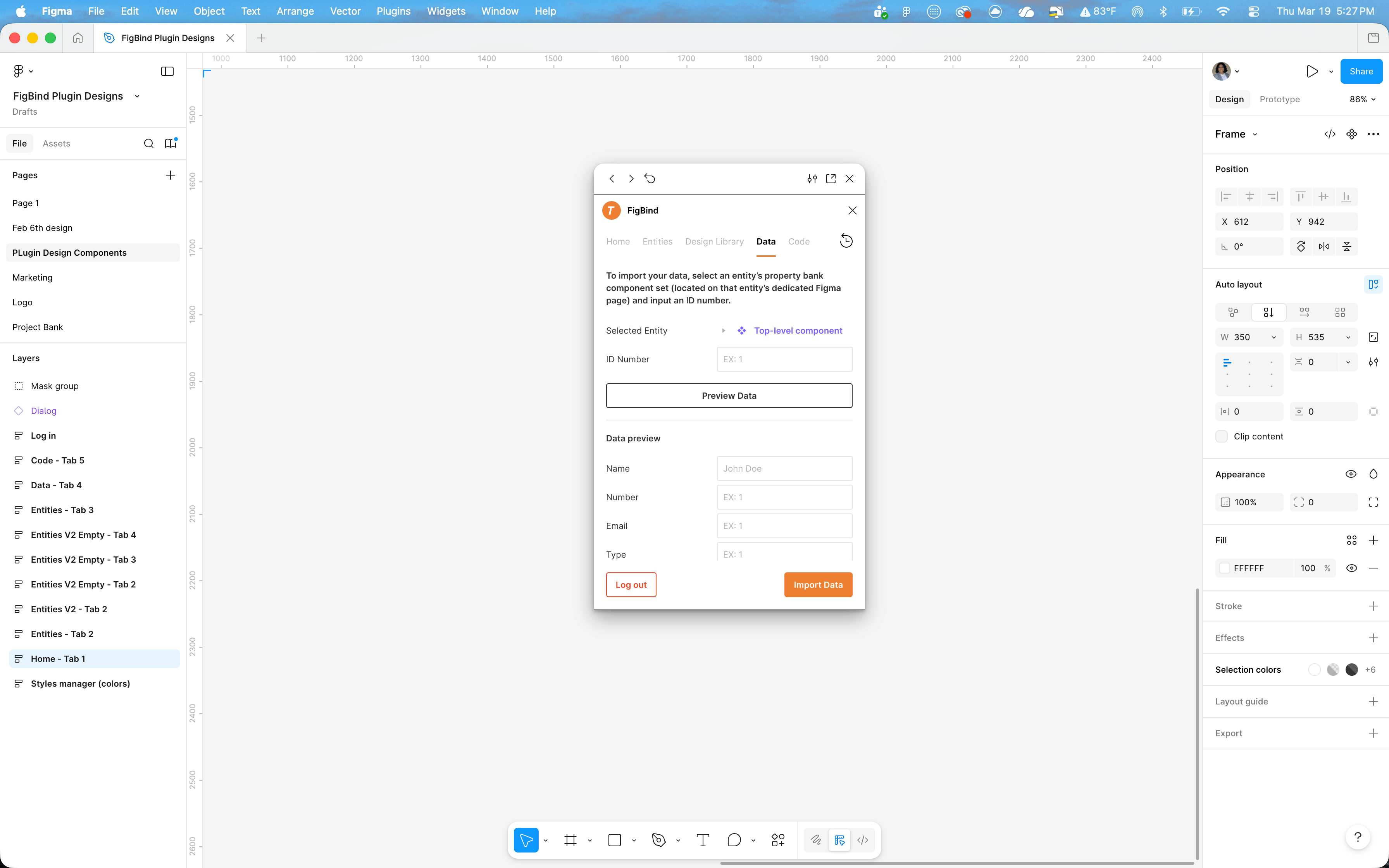
With FigBind, this process is concurrent. Designers can update designs as needed and export the React code themselves, enabling developers to forgo a re-do of the entire code. Rather, they can take the snippet of code from the updated design and implement that directly in their code base.


JUIPAITHANE
FigBind
FigBind is Figma plugin that connects users' Figma designs directly to their application backend, enabling live data preview and streamlined data mapping and code generation.
Client:
eTelic Inc.
Role:
Product Designer & Manager
Industry:
Technology
The Problem
Eliminating friction in the developer handoff and reducing gaps between designs and developer output.
The Impact
Streamlined the developer handoff by syncing Figma designs with application backends and live code.

Role Snapshot
My role:
Product Designer & Manager
Team:
1 PM/Designer, 2 Developers, Stakeholder from eTelic Inc.
Responsibilities:
Systems Thinking, Workflow Mapping, High-Fidelity UI, Marketing Content Creation
A Figma Plugin Connecting Data to Design
The Situation
At etelic Inc., our mission is to make application building simple, secure, and scalable. We developed a no-code, low-code application developer, Turanto, that enables users to build large, enterprise level applications, without needing to code. We have countless templates for various industries, and a plethora of different features built into the platform. For most of our clients, the template designs for both web and mobile were more than sufficient. But this wasn't good enough for us.
A good user interface is crucial for the success of any application, but it requires constant back and forth communication between designers, developers, and stakeholders. This pipeline takes time, money, and resources -- things that are limited for us as a small business. Even with Figma's native tools and existing plug-ins, it took weeks to develop and deploy custom screens for our enterprise-level applications.
So, we got to thinking... What if designers could directly connect their Figma files to live APIs, without needing to know a single line of React code? What if we could templatize front-end development just like we did with back-end development?
The Process
I started by understanding existing industry solutions for this problem. While there are a plethora of plugins that get you 80% of the way, none of them offered full end-to-end data mapping. Since we were using our own in-house software, Turanto, as a use case, I knew we would be able to bring in much more of the application structure than other industry solutions. As a UI/UX designer, I was already familiar with the usual design process and I wanted to maintain as much of that for users using FigBind.
Designers are already used to inserting component instances in various places to repeat designs, so I decided the best way to import the data model would be through these components. Turanto being an entity based application meant that each entity had certain properties, all of which could be converted into text. So, I pitched the idea of a "property bank". Each entity, when imported into Figma through FigBind, would have a component set (the property bank). This component set has two variant groups: Data Type and Entity Property. Data Type enables users to select between label and value, and entity property allows users to select which specific property they would like to display. The property bank component set contains all properties for an entity, with both their label and value. To "bind" this data to a custom screen, the user simply has to insert an instance of the property bank component and select the desired variant. Additionally, the master component set can be customized as normal, so users have full control over how these properties show up throughout the app.
Turanto is build to be reproducible and scalable, meaning the components used throughout the applications are uniform and repeatable. This enabled me to create designs for each of the existing components, like cards or grids, culminating in a template that was easy to repeat and import into the application. Our development team worked on created a code generation component for FigBind, which enhanced the user experience as designers no longer had to go back and forth with developers to identify the specifics of what needs to be developed.
The Outcome
Often, designers skip the error pages (No internet, search not found, etc.), leaving developers to guess later. With FigBind, there is no guess work needed. FigBind provides your team with pre-built screens for every error page and edge case, ensuring that your end users never experience any gaps in their user journey.
In the traditional workflow, development can only begin AFTER designs are completed. The consequtive process creates time sinks, forcing one team to stop working so that the other team can begin. Further, a common pain point in this process is the Linear Waterfall Bottleneck. If a developer finds a technical limitation in Week 3, the designer has to go back to Phase 1, delaying the entire launch.
With FigBind, this process is concurrent. Designers can update designs as needed and export the React code themselves, enabling developers to forgo a re-do of the entire code. Rather, they can take the snippet of code from the updated design and implement that directly in their code base.

JUIPAITHANE
FigBind
FigBind is Figma plugin that connects users' Figma designs directly to their application backend, enabling live data preview and streamlined data mapping and code generation.
Client:
eTelic Inc.
✧
Role:
Product Designer & Manager
✧
Industry:
Technology
The Problem
Eliminating friction in the developer handoff and reducing gaps between designs and developer output.
The Impact
Streamlined the developer handoff by syncing Figma designs with application backends and live code.

Role Snapshot
My role:
Product Designer & Manager
Team:
1 PM/Designer, 2 Developers, Stakeholder from eTelic Inc.
Responsibilities:
Systems Thinking, Workflow Mapping, High-Fidelity UI, Marketing Content Creation
A Figma Plugin Connecting Data to Design
The Situation
At etelic Inc., our mission is to make application building simple, secure, and scalable. We developed a no-code, low-code application developer, Turanto, that enables users to build large, enterprise level applications, without needing to code. We have countless templates for various industries, and a plethora of different features built into the platform. For most of our clients, the template designs for both web and mobile were more than sufficient. But this wasn't good enough for us.
A good user interface is crucial for the success of any application, but it requires constant back and forth communication between designers, developers, and stakeholders. This pipeline takes time, money, and resources -- things that are limited for us as a small business. Even with Figma's native tools and existing plug-ins, it took weeks to develop and deploy custom screens for our enterprise-level applications.
So, we got to thinking... What if designers could directly connect their Figma files to live APIs, without needing to know a single line of React code? What if we could templatize front-end development just like we did with back-end development?
The Process
I started by understanding existing industry solutions for this problem. While there are a plethora of plugins that get you 80% of the way, none of them offered full end-to-end data mapping. Since we were using our own in-house software, Turanto, as a use case, I knew we would be able to bring in much more of the application structure than other industry solutions. As a UI/UX designer, I was already familiar with the usual design process and I wanted to maintain as much of that for users using FigBind.
Designers are already used to inserting component instances in various places to repeat designs, so I decided the best way to import the data model would be through these components. Turanto being an entity based application meant that each entity had certain properties, all of which could be converted into text. So, I pitched the idea of a "property bank". Each entity, when imported into Figma through FigBind, would have a component set (the property bank). This component set has two variant groups: Data Type and Entity Property. Data Type enables users to select between label and value, and entity property allows users to select which specific property they would like to display. The property bank component set contains all properties for an entity, with both their label and value. To "bind" this data to a custom screen, the user simply has to insert an instance of the property bank component and select the desired variant. Additionally, the master component set can be customized as normal, so users have full control over how these properties show up throughout the app.
Turanto is build to be reproducible and scalable, meaning the components used throughout the applications are uniform and repeatable. This enabled me to create designs for each of the existing components, like cards or grids, culminating in a template that was easy to repeat and import into the application. Our development team worked on created a code generation component for FigBind, which enhanced the user experience as designers no longer had to go back and forth with developers to identify the specifics of what needs to be developed.
The Outcome
Often, designers skip the error pages (No internet, search not found, etc.), leaving developers to guess later. With FigBind, there is no guess work needed. FigBind provides your team with pre-built screens for every error page and edge case, ensuring that your end users never experience any gaps in their user journey.
In the traditional workflow, development can only begin AFTER designs are completed. The consequtive process creates time sinks, forcing one team to stop working so that the other team can begin. Further, a common pain point in this process is the Linear Waterfall Bottleneck. If a developer finds a technical limitation in Week 3, the designer has to go back to Phase 1, delaying the entire launch.
With FigBind, this process is concurrent. Designers can update designs as needed and export the React code themselves, enabling developers to forgo a re-do of the entire code. Rather, they can take the snippet of code from the updated design and implement that directly in their code base.