JUIPAITHANE

JUIPAITHANE
CrisisCare360
TN Department of Health
Healthcare
I directed marketing and produced UI/UX designs for a SaaS based software solution, designed to automate operations and elevate patient care for in-patient behavioral healthcare facilities.
Go to website

View marketing

The Situation
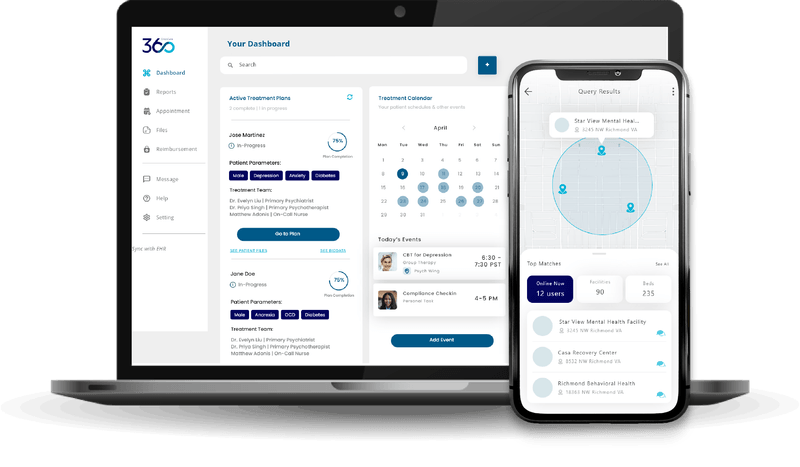
Our client, the Tennessee Department of Health, enlisted our services to develop a one-stop-shop application aimed at matching patients experiencing mental health crises to an available, appropriate hospital or facility for mental health services. While we were able to provide them with the desired software, I noticed the existing UI was a bit mechanical. The existing UI emulated a lot of big tech softwares, making intuitive use of the application harder. Further, we were missing a big sector -- emergency responders. Since this application was optimized for web, it was harder for emergency responders in the field to navigate it. Further, our clients were using a couple different applications of ours: One to match patients to a hospital, one to manage hospital logistics, and a final one to manage treatment a patient received. So, I asked our team: What if we merged everything into one unified system?
The Process
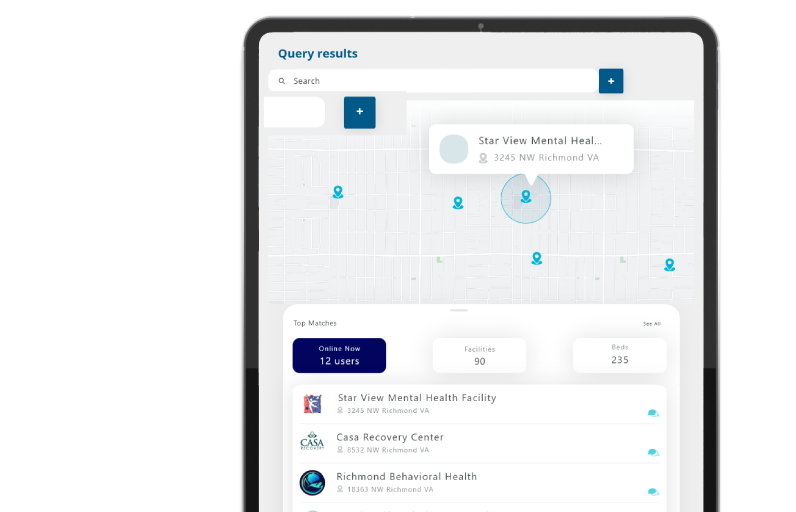
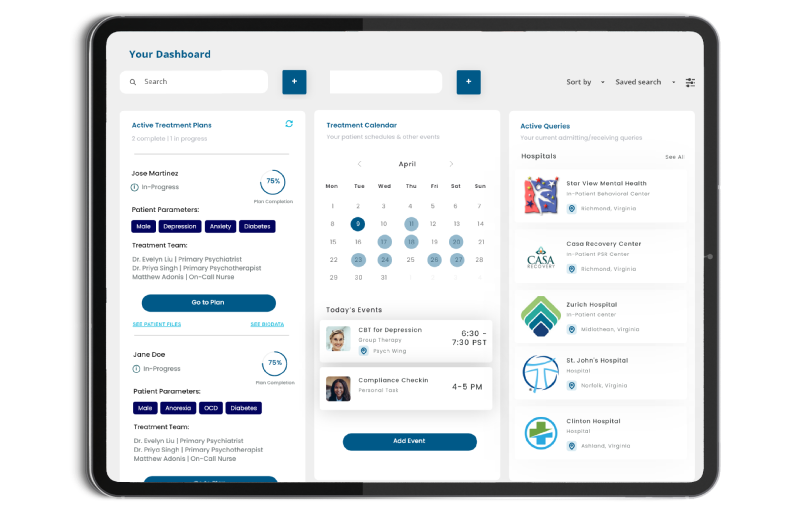
I began by exploring all the different apps our client was currently using, understanding the pain points and benefits of each. From there, I sat down with the heads of various departments who use the app and tried to understand their specific needs and workflows. I drafted a basic use case from start to finish across all three apps, starting with searching for a hospital bed and ending with treatment management and discharge. After going over this flow with the aforementioned department heads, I began designing. As is expected, I began by exploring various tones and "feels" for our final app, and settled on a calm look with blue and purple as the main colors. From there, I noted down which pieces of the different apps were already interacting with each other. These were the first items that got designed, as they would lay the foundation of how the different backend apps would seamlessly flow together in one unified front end. Working closely with the development team, I designed a unified UI for all of our applications, creating one system: CrisisCare360. In this new frontend, users are able to search for a facility, admit patients, keep track of their electronic health records, manage treatment, and share notes with others within the department.
The Outcome
The final app, CrisisCare360, is optimized for web, tablet, AND mobile since a large portion of our users may be out in the field as emergency responders. With everything unified under one UI, our clients found it easier to navigate throughout the whole client care process. Instead of jumping back and forth between apps, and their own EHR system, they are now able to have only one window open with all their information. We offered our clients the ability to sync the CrisisCare360 app with their own EHR system, further unifying all their processes. To get our customers used to this new interface, I designed and developed numerous marketing and training materials. Additionally, with the widespread capabilities and overall societal need for such an app, I began creating more universal marketing material. You can check out the one-page flyer here and the product deck here!
Explore more...
JUIPAITHANE
JUIPAITHANE
CrisisCare360
TN Department of Health
✧
Healthcare
I directed marketing and produced UI/UX designs for a SaaS based software solution, designed to automate operations and elevate patient care for in-patient behavioral healthcare facilities.
View marketing
Go to website
The Situation
Our client, the Tennessee Department of Health, enlisted our services to develop a one-stop-shop application aimed at matching patients experiencing mental health crises to an available, appropriate hospital or facility for mental health services. While we were able to provide them with the desired software, I noticed the existing UI was a bit mechanical. The existing UI emulated a lot of big tech softwares, making intuitive use of the application harder. Further, we were missing a big sector -- emergency responders. Since this application was optimized for web, it was harder for emergency responders in the field to navigate it. Further, our clients were using a couple different applications of ours: One to match patients to a hospital, one to manage hospital logistics, and a final one to manage treatment a patient received. So, I asked our team: What if we merged everything into one unified system?
The Process
I began by exploring all the different apps our client was currently using, understanding the pain points and benefits of each. From there, I sat down with the heads of various departments who use the app and tried to understand their specific needs and workflows. I drafted a basic use case from start to finish across all three apps, starting with searching for a hospital bed and ending with treatment management and discharge. After going over this flow with the aforementioned department heads, I began designing. As is expected, I began by exploring various tones and "feels" for our final app, and settled on a calm look with blue and purple as the main colors. From there, I noted down which pieces of the different apps were already interacting with each other. These were the first items that got designed, as they would lay the foundation of how the different backend apps would seamlessly flow together in one unified front end. Working closely with the development team, I designed a unified UI for all of our applications, creating one system: CrisisCare360. In this new frontend, users are able to search for a facility, admit patients, keep track of their electronic health records, manage treatment, and share notes with others within the department.
The Outcome
The final app, CrisisCare360, is optimized for web, tablet, AND mobile since a large portion of our users may be out in the field as emergency responders. With everything unified under one UI, our clients found it easier to navigate throughout the whole client care process. Instead of jumping back and forth between apps, and their own EHR system, they are now able to have only one window open with all their information. We offered our clients the ability to sync the CrisisCare360 app with their own EHR system, further unifying all their processes. To get our customers used to this new interface, I designed and developed numerous marketing and training materials. Additionally, with the widespread capabilities and overall societal need for such an app, I began creating more universal marketing material. You can check out the one-page flyer here and the product deck here!
Explore more...
JUIPAITHANE
CrisisCare360
TN Department of Health
✧
Healthcare
I directed marketing and produced UI/UX designs for a SaaS based software solution, designed to automate operations and elevate patient care for in-patient behavioral healthcare facilities.
View marketing
Go to website
The Situation
Our client, the Tennessee Department of Health, enlisted our services to develop a one-stop-shop application aimed at matching patients experiencing mental health crises to an available, appropriate hospital or facility for mental health services. While we were able to provide them with the desired software, I noticed the existing UI was a bit mechanical. The existing UI emulated a lot of big tech softwares, making intuitive use of the application harder. Further, we were missing a big sector -- emergency responders. Since this application was optimized for web, it was harder for emergency responders in the field to navigate it. Further, our clients were using a couple different applications of ours: One to match patients to a hospital, one to manage hospital logistics, and a final one to manage treatment a patient received. So, I asked our team: What if we merged everything into one unified system?
The Process
I began by exploring all the different apps our client was currently using, understanding the pain points and benefits of each. From there, I sat down with the heads of various departments who use the app and tried to understand their specific needs and workflows. I drafted a basic use case from start to finish across all three apps, starting with searching for a hospital bed and ending with treatment management and discharge. After going over this flow with the aforementioned department heads, I began designing. As is expected, I began by exploring various tones and "feels" for our final app, and settled on a calm look with blue and purple as the main colors. From there, I noted down which pieces of the different apps were already interacting with each other. These were the first items that got designed, as they would lay the foundation of how the different backend apps would seamlessly flow together in one unified front end. Working closely with the development team, I designed a unified UI for all of our applications, creating one system: CrisisCare360. In this new frontend, users are able to search for a facility, admit patients, keep track of their electronic health records, manage treatment, and share notes with others within the department.
The Outcome
The final app, CrisisCare360, is optimized for web, tablet, AND mobile since a large portion of our users may be out in the field as emergency responders. With everything unified under one UI, our clients found it easier to navigate throughout the whole client care process. Instead of jumping back and forth between apps, and their own EHR system, they are now able to have only one window open with all their information. We offered our clients the ability to sync the CrisisCare360 app with their own EHR system, further unifying all their processes. To get our customers used to this new interface, I designed and developed numerous marketing and training materials. Additionally, with the widespread capabilities and overall societal need for such an app, I began creating more universal marketing material. You can check out the one-page flyer here and the product deck here!
Explore more...
JUIPAITHANE